
A Children smart watch is a wearable device designed to help a child stay connected and build simple routines. It may show the time, allow calls to approved contacts, or share a location with a parent. Features differ by model, so the name alone does not tell you what the watch can do. One model may need a separate mobile plan; another may work only when paired with a nearby phone. Some include reminders or activity tracking. Others keep things simpler.
Picture a child walking home after school, checking the time at a bus stop, or calling a caregiver when plans change. In those moments, a watch can be useful. But location updates may be delayed, especially indoors or where signal coverage is weak. Battery life matters, too. A device left uncharged in a backpack cannot help much. Useful, but imperfect.
Before choosing one, check the manufacturer’s instructions, supported network, contact controls, and privacy settings. Ask what information the watch collects and how it can be removed or shared. Let the child practice calling and charging it before relying on it during a busy school day. A watch should support clear family routines, not replace conversations or adult supervision. No device guarantees safety. The right choice depends on the child’s age, daily route, comfort wearing a screen, and the family’s needs. A little skepticism is healthy: extra features can sound reassuring, yet simple controls and dependable charging may matter more.
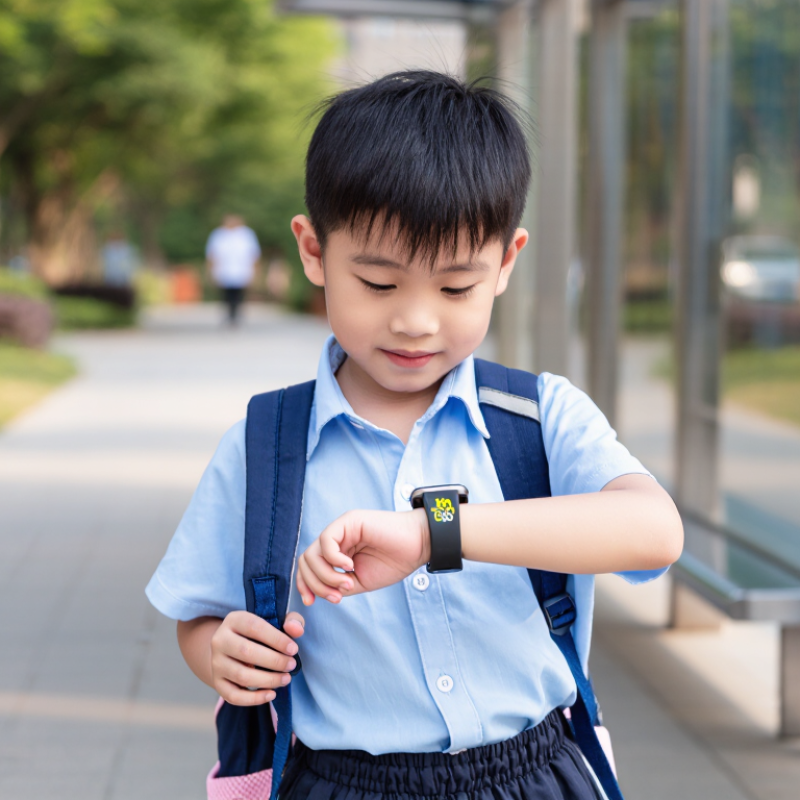
A smartwatch for children is a wearable device designed to support communication, timekeeping, and simple daily routines. Depending on the model, it may include calling, messaging, location sharing, reminders, or activity tracking.
Some watches need a nearby phone; others connect independently through a mobile network. Features differ, so caregivers should check how each function works before relying on it.
Its purpose is practical, not magical. A child might use a preset contact button after school, check the time during a sports practice, or receive a reminder to pack a library book.
Location sharing can offer reassurance, but readings may be delayed or inaccurate indoors, near tall buildings, or when a connection is weak. It is not constant supervision. Settings matter. Caregivers should review contact lists, location permissions, data collection, and screen limits together with the child.
A simple explanation helps: who can reach the watch, and when?
The device can also distract, especially during lessons or family meals. Some children may find it reassuring; others may feel watched. That part deserves honest discussion.
A smartwatch works best as a small communication aid, with clear boundaries and adult judgment—not as a replacement for conversation or care.
A children’s smartwatch combines a small screen, a wristband, a battery, and electronics inside a protective case. The screen usually shows the time, messages, and simple menus. Large icons help children navigate without tapping tiny controls. A secure, adjustable band matters too; a watch that slips around can become distracting during class or play.
Inside, a processor runs the watch’s software, while a rechargeable battery powers its sensors and wireless connections. Depending on the model, GPS may help caregivers view a child’s approximate location. Cellular connectivity can support calls or messages, often with approved contacts only. Some watches add an emergency button, activity tracking, or location-zone alerts. Settings vary. GPS readings may be less precise indoors, and alerts can arrive late when coverage is weak. These tools can offer useful context, but they cannot replace direct supervision.
Practical features deserve a close look. Caregivers should check battery life under typical use, charging time, water resistance, and how clearly privacy settings are explained. A camera or microphone may seem convenient, yet each adds another feature to manage. The most impressive specification is not always the most useful one. A child may find a bulky watch uncomfortable, or forget to charge it. Real routines are messy, and that matters.
A children’s smartwatch is a small wearable computer, not just a clock. Its touchscreen, processor, battery, microphone, and speaker support basic tasks such as calling approved contacts, sending short messages, and setting reminders. Many models also use GPS and cellular networks to estimate a child’s location. GPS works best outdoors; buildings can make readings less precise. Location dots can drift.
Some watches send location updates to a linked caregiver app through a mobile connection. Others use Wi-Fi or nearby signals to help estimate position. The GSMA Intelligence 2024 Mobile Economy report estimates that cellular IoT connections will grow from 3.5 billion in 2023 to 5.8 billion by 2030. That figure describes a wider connected-device trend, not children’s watches alone. Still, it helps explain how small devices can exchange data without a phone nearby.
Caregivers usually configure contacts, quiet hours, and location sharing in the companion app. Certain models include an SOS button, which can call preset contacts; it is not a guarantee of immediate help. Setup can be fiddly. A weak signal, low battery, or missed permission setting may interrupt updates. Check what information the watch collects, who can view it, and how long it is stored. Children should know when location sharing is active. The technology is useful, but it can be imperfect.
A children’s smartwatch can estimate sleep duration from movement and other available sensor data. These estimates can help families discuss sleep routines, but they are not a medical measurement. The chart shows recommended sleep durations by age group.
Source: U.S. Centers for Disease Control and Prevention (CDC), sleep recommendations.
A children’s smartwatch can support small, everyday routines. A child might check the time before leaving for school or use a quiet reminder to pack a library book. Some watches allow simple calls or messages with approved contacts, which can help caregivers coordinate pickup changes. A clear routine matters more than a long list of features. Small reminders help.
For caregivers, a watch may offer another way to stay in touch during a busy afternoon. It can be useful when a child walks between familiar places, attends an activity, or waits for a ride. However, location information can be delayed or inaccurate, especially indoors. A device cannot replace agreed meeting points, clear instructions, or adult supervision. Children also deserve an age-appropriate explanation of what information the watch collects and who can see it. That conversation may feel awkward, but skipping it is not ideal.
Tips: Set up only the contacts and alerts your family needs. Check privacy and location settings together, and test the device before relying on it. Agree on what your child should do if the battery dies or a message does not arrive. Keep the plan simple.
| Everyday Use | How It Can Help a Child | How It Can Help a Caregiver | Practical Considerations |
|---|---|---|---|
| Time and reminders | Shows the time and may provide reminders for routines such as getting ready for school or starting an activity. | Can support agreed routines without relying on repeated verbal reminders. | Reminder and alarm features vary by device; children may need help setting them up. |
| Calling or messaging | Some models allow a child to contact approved people, depending on the device and its service plan. | May provide a simple way to check in when a child is away from home. | Calling, messaging, and contact controls are not available on every watch. Mobile service, setup, and caregiver settings may be required. |
| Location sharing | On supported models, location features can help a child and caregiver coordinate meeting points. | May offer a location estimate through a caregiver’s app or account. | Location accuracy and update frequency can vary with signal, surroundings, device settings, and battery level. It should not be treated as a guarantee of safety. |
| Emergency contact features | Some watches include a shortcut for contacting designated adults or starting an emergency-related action. | Can make a pre-agreed contact option easier to access. | Features differ, and an alert may depend on connectivity, setup, and battery power. A watch is not a substitute for adult supervision or local emergency services. |
| Activity tracking | May count steps or record movement, making everyday activity easier to notice. | Can provide a general view of activity trends when the feature is enabled. | Consumer activity estimates are not medical measurements. Fit, movement, and device settings can affect results. |
| School and quiet-time routines | Some devices offer quiet or restricted-use settings for agreed times. | Caregivers may be able to limit notifications or selected functions during school, sleep, or family time. | Controls vary by model. Check school rules and agree on when the watch may be used. |
| Independence and responsibility | Using a watch can help a child practise checking the time, following reminders, and contacting trusted adults. | Provides an opportunity to discuss boundaries, privacy, and what to do if the device is lost or unavailable. | Choose features that suit the child’s age and needs, and review permissions and contacts together. |
What Is a Smart Watch for Children?
Safety, Privacy, and Practical Limitations
A children’s smartwatch can offer calling, location sharing, and simple reminders from a wrist. Ofcom’s 2024 Children and Parents: Media Use and Attitudes report found that around one in five children aged 5–7 owned a smartwatch. That figure shows adoption, not proof of safety. GPS can help a caregiver find a child outdoors, but location updates may lag or fail indoors. A watch is one tool, not a substitute for a child knowing whom to ask for help.
Privacy deserves equal attention. Location history, contact lists, voice recordings, and account details may pass through an app or cloud service. NIST’s IoT cybersecurity guidance, NISTIR 8259A, highlights capabilities such as protecting stored data and providing secure software updates. Parents should check what data a device collects, who can access it, and how long it remains stored. The small screen also makes settings harder to review. That limitation is easy to overlook.
Tips: Set location sharing only with trusted caregivers, use a strong account password, and review permissions together. Try the watch near home before relying on it during a busy school pickup. Ask the child to practice calling a caregiver. The battery may run low; the signal may disappear. That is worth planning for.
A child can check the time before school or get a reminder to pack a library book. Small reminders help.
Simple calls or messages with approved contacts may help share pickup changes. It is not always reliable.
Not always. Updates can be delayed or inaccurate, especially indoors. It is tempting to trust the map too much, but a watch cannot replace meeting points or adult supervision.
It may handle location history, contact lists, voice recordings, and account details through an app or cloud service. Check what is stored.
Share location only with trusted caregivers, use a strong account password, and review permissions together. Explain who can see the information.
Yes. Explain what the watch collects and who can access it, using age-appropriate language. The conversation may feel awkward.
Test it near home, check the settings, and practice calling a caregiver. Also agree what to do if a message fails.
Make a backup plan, such as a known meeting point and clear instructions. Batteries run low. That part is easy to forget.
A Children smart watch is a wearable device designed to help children stay connected and support caregivers in keeping track of everyday routines. Depending on its design, it may include a screen, buttons or touch controls, a battery, location services, and communication tools. Common features can include calling or messaging approved contacts, time and alarm functions, activity tracking, and location sharing. The available tools vary, so families should check what a particular device can and cannot do.
In daily life, a child may use the watch to check the time, follow reminders, or contact a caregiver, while adults may use it to coordinate pickups or check a child’s location when appropriate. These watches can be useful, but they are not substitutes for supervision or emergency services. Location information and messages can raise privacy concerns, and connectivity, battery life, accuracy, durability, and a child’s comfort may limit usefulness. Caregivers should review privacy settings, explain responsible use, and choose features that fit the child’s age and family needs.